
Booking studio time for your first episode feels exciting until the clock starts. Then a guest runs late, a microphone hums, and you realize you never asked how you will get your files.
A clear podcast recording checklist prevents most of those problems. You do not need years of audio experience. You need a plan for the run of show, your guests' arrival, the sound check, and the file handover.
This guide walks you through each stage of a first studio session, from the week before to the moment you leave with your files. It also covers what to ask any studio or podcast room before you book.
Why Preparation Matters More Than Gear
Podcasting keeps growing in Canada. According to The Canadian Podcast Listener study, 46% of Canadian adults listened to podcasts monthly in 2025.
That growing audience is good news, but it also means listeners have plenty of choice. Clear audio and a well-paced conversation help a new show earn a second listen.
Studio time is also usually booked by the hour. Every minute spent hunting for a cable or waiting for a guest is a minute you cannot record. Preparation protects both your budget and your episode.
One Week Out: Build Your Run of Show
A run of show is a simple timeline for your episode. It tells everyone what happens, in what order, and for how long.
Here is a sample run of show for a 30-minute interview episode:
| Segment | Length | Who | Notes |
|---|---|---|---|
| Cold open | 0:30 | Host | One-line hook about the topic |
| Intro | 1:30 | Host | Show name, episode topic, guest introduction |
| Segment 1 | 10:00 | Host and guest | Guest background and main story |
| Segment 2 | 12:00 | Host and guest | Practical advice for listeners |
| Rapid-fire questions | 4:00 | Host and guest | Short, fun questions |
| Outro | 2:00 | Host | Where to find the guest, call to action |
Alongside the timeline, prepare:
- Your question list: Write more questions than you need and mark the must-asks.
- Exact wording for the intro and outro: Reading these word for word saves retakes.
- Correct names and titles: Confirm spelling and pronunciation with each guest.
- A buffer: Book at least 30 to 45 minutes more studio time than your episode length.
Getting Guests There at the Right Moment
Guest timing is where first sessions most often go off track. Plan it as carefully as the episode itself.
Send a guest prep pack
A few days before, send each guest a short email with the address, parking details, arrival time, the topics you will cover, and roughly how long they will be on mic. Guests who know what to expect sound more relaxed.
Set a call time, not just a start time
Ask in-studio guests to arrive 20 to 30 minutes before you plan to record. That window covers parking, a coffee, a mic fitting, and a quick level check without eating into recording time.
Plan for remote guests
If a guest joins online, run a short tech check the day before. Ask them to use wired headphones, sit in a quiet room with soft furnishings, and connect to stable internet. Have their phone number handy in case the call drops.
Confirm permission to publish
Get each guest's agreement to record and publish the conversation in writing, even a simple email reply. It avoids awkward questions later.
Recording Day: Sound Checks That Save Your Episode
Arrive at least 15 minutes before your booking starts. Then work through these checks before you hit record on the real episode.
- Silence the room: Put phones in airplane mode, turn off notifications, and ask about any noisy ventilation or equipment.
- Position each microphone: Keep a consistent distance, roughly a hand's width from the mouth, and angle it slightly to reduce harsh "p" sounds.
- Set levels: Ask each person to speak at their normal energy, including a laugh, and adjust so nobody clips.
- Wear headphones: Listening while you record helps you catch hums, rustles, and pops immediately.
- Record a one-minute test: Play it back and listen for echo, buzzing, or one voice much quieter than another.
- Capture room tone: Record 30 seconds of silence, which helps your editor smooth out cuts later.
- Clap at the start: If you record video or on more than one device, a single clap makes it easier to line up the files.
During the recording, keep water nearby, avoid tapping the table, and pause briefly before restarting a fumbled sentence. A clean pause is much easier to edit than an overlapping retake.
Before You Leave: Ask About Your Files
The file handover is the step first-time podcasters forget most often. Ask these questions before you book, then confirm them before you walk out the door.
- What format will I receive? Uncompressed WAV files, commonly at 48 kHz and 24-bit, give your editor the most flexibility.
- Will each microphone be on its own track? Separate tracks make it much easier to fix one person's volume or remove a cough.
- How will I get the files? A USB drive, a cloud link, or both. Bring your own drive just in case.
- How long are files kept? Some spaces delete recordings after a set period, so download and back up right away.
- Is video included? If you plan to post clips, confirm camera angles and video file formats.
- Is editing included or separate? Know whether you are leaving with raw files or a finished episode.
Keep in mind that raw files are only the starting point. Your final episode should meet platform standards. For example, Apple Podcasts recommends a loudness of about -16 LKFS with true peaks no higher than -1 dBFS, which your editor sets during mastering.
Your At-a-Glance Recording Checklist
One week before
- Finalize your run of show and questions
- Confirm guests, names, and pronunciation
- Book studio time with a buffer
- Ask the studio about equipment and file delivery
The day before
- Send guests their prep pack and call time
- Run a tech check with remote guests
- Charge devices and pack a USB drive and headphones
On the day
- Arrive early and silence phones
- Set mic positions and levels
- Record a test, then room tone
- Follow your run of show
Before you leave
- Confirm your files and how they will be delivered
- Back up recordings to two places
- Thank your guest and share the expected release date
Recording Your Podcast at Bright Workspace
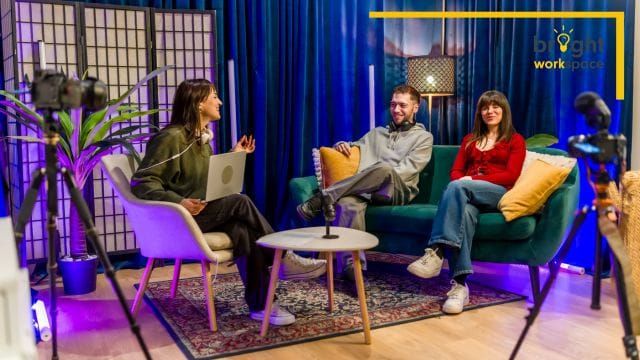
Bright Workspace is a local Ontario coworking provider with podcast rooms listed among its amenities, alongside private offices, meeting rooms, and coworking desks. Its locations include Burlington, Grimsby, Hamilton, Niagara Falls, St. Catharines, and Welland.
Equipment and room setup can vary by location, so contact the team to book a podcast room and confirm what is included before your session. Free parking at Bright Workspace locations also makes guest arrivals simpler.
Here is how different podcasters might use the space:
A business owner launching a company podcast
A Burlington accounting firm owner records a monthly episode with clients. She uses a bookable meeting room as a waiting area for guests, then moves into the podcast room to record.
A consultant recording an interview series
A Hamilton consultant records three interviews in one afternoon. Between sessions, he reviews his notes at a coworking desk with a day pass, then starts editing the first episode before driving home.
If you record regularly, Bright Workspace coworking memberships include a 20% discount on additional services, giving you a home base for planning, editing, and meeting guests.
Frequently Asked Questions
How long should I book for my first podcast session?
Book your planned episode length plus at least 30 to 45 minutes. That buffer covers setup, sound checks, and a few retakes.
For a 30-minute episode, a 90-minute booking is a comfortable starting point.
What should I bring to a podcast studio?
- Your run of show and question list
- Headphones you are comfortable wearing
- A USB drive for your files
- Water, and a snack for longer sessions
- Guest names, titles, and links for the outro
How early should podcast guests arrive?
Ask guests to arrive 20 to 30 minutes before recording starts. That gives time to settle in, fit microphones, and run a quick level check.
What file format should I ask for after recording?
Ask for uncompressed WAV files with each microphone on a separate track. These give your editor the most control. Your editor can then export the final episode as an MP3 or AAC file for publishing.
Do I need to edit my podcast after a studio session?
Almost always, yes. Even a clean recording benefits from trimming, level matching, and loudness mastering. Ask whether the studio offers editing, or plan to edit yourself or hire an editor.
Walk In Prepared, Walk Out With a Great Episode
A solid podcast recording checklist comes down to four things: a clear run of show, well-timed guests, careful sound checks, and a confirmed file handover. Get those right, and your first studio session will feel smooth instead of rushed.
Bright Workspace gives Ontario podcasters a professional place to record, meet guests, and edit, with free parking and flexible options across its locations.
Ready to record? Contact our team to book a podcast room and plan your first session.